Writing · · Purview, Sensitivity labels, SharePoint
Your SharePoint site is labelled. Your files aren't.
Label a SharePoint site Highly Confidential and the files inside stay exactly as they were: unlabelled. Container labels and file labels do different jobs. Here's the test, and what to do instead.
You label a SharePoint site Highly Confidential. Are the files inside it protected now?
No. I tested it in my lab, and the files inside stayed exactly as they were: unlabelled. Here’s why, and what to do instead.
Two kinds of label, two different jobs
A sensitivity label in Microsoft Purview can be applied to two different things.
A container label goes on a SharePoint site, a Microsoft Team or a Microsoft 365 group. It controls the room:
- privacy (private or public)
- whether guests can be added
- external sharing for the site
A file label goes on a document or an email. It controls the file itself:
- headers, footers and watermarks
- encryption, if the label has it
The two are independent. A container label does not label the files inside the container. And only one of them travels with a file when it’s downloaded or copied out: the file label.
Microsoft says it in the product
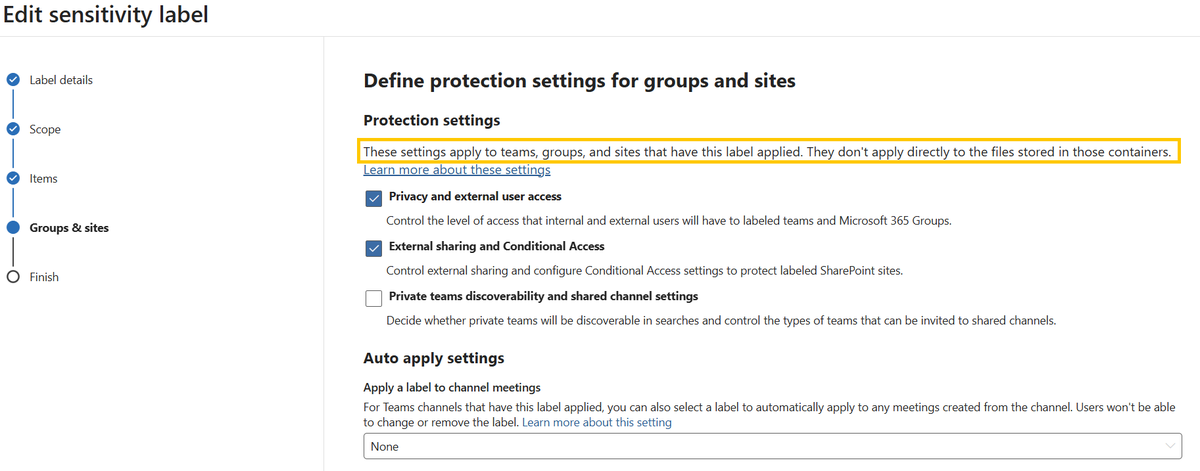
When you set up a label for sites and groups, the wizard tells you on the first page:
These settings apply to teams, groups, and sites that have this label applied. They don’t apply directly to the files stored in those containers.
What I tested
1. Configured Highly Confidential for sites. In the label’s Groups & sites settings:
- Privacy: Private
- Guests: owners can’t add people outside the organisation
- External sharing: only people in your organisation
2. Applied it to the Finance site in the SharePoint admin centre.

The label now owns those settings. SharePoint says so: “The selected sensitivity label has inherent external file sharing setting, this overrides the existing setting.” External file sharing is greyed out at “Only people in your organization”.
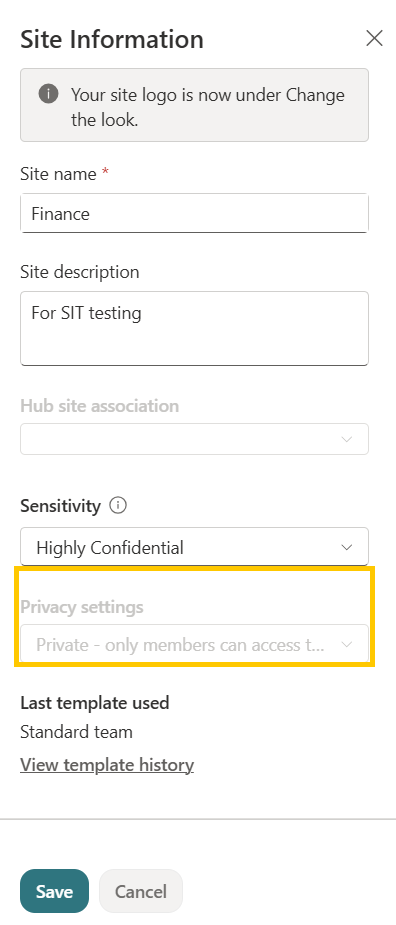
Inside the site it’s the same story. In Site information, the privacy setting is greyed out, so a site owner can’t quietly make it public.
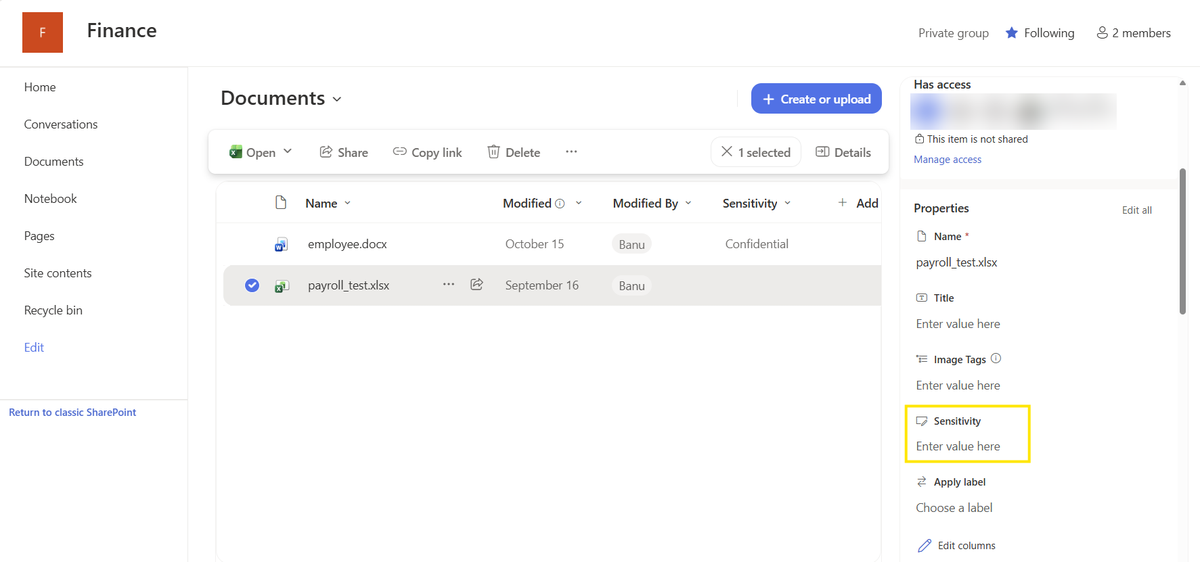
3. Checked the files inside. In the Finance site’s document library, I selected payroll_test.xlsx and opened its details. Sensitivity: empty. No label, even though it sits inside a Highly Confidential site.
4. Downloaded it. The downloaded copy had no label either. The site’s protection stayed behind on the site.
Labelling the files
To protect the files themselves, they need file labels.
One file at a time: open it and pick a label from the Sensitivity button. My test document, employee.docx, got the Confidential label, and the “VB Confidential” header appeared straight away.
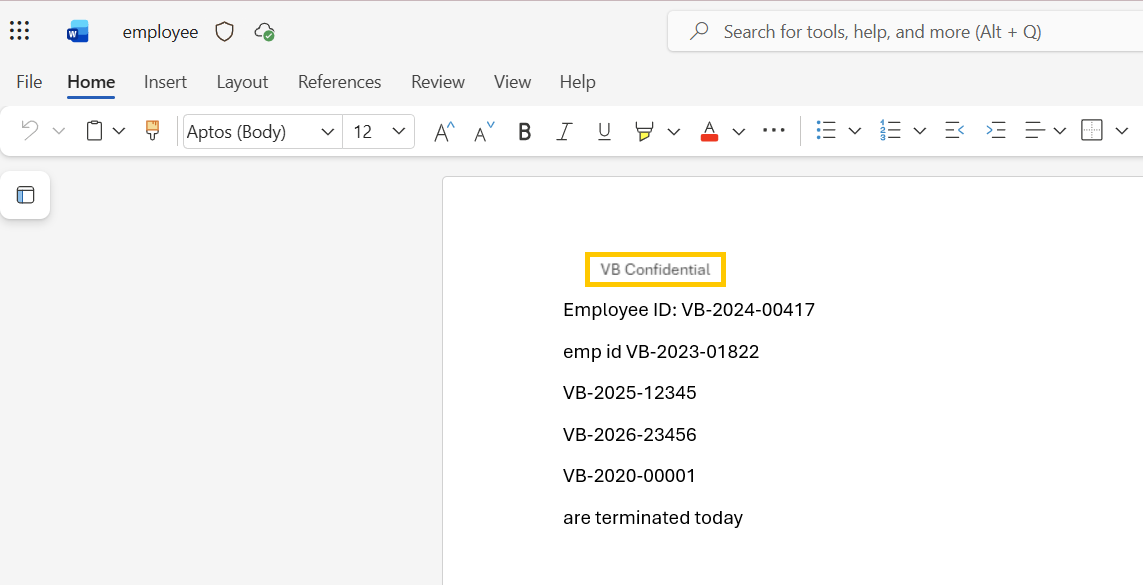
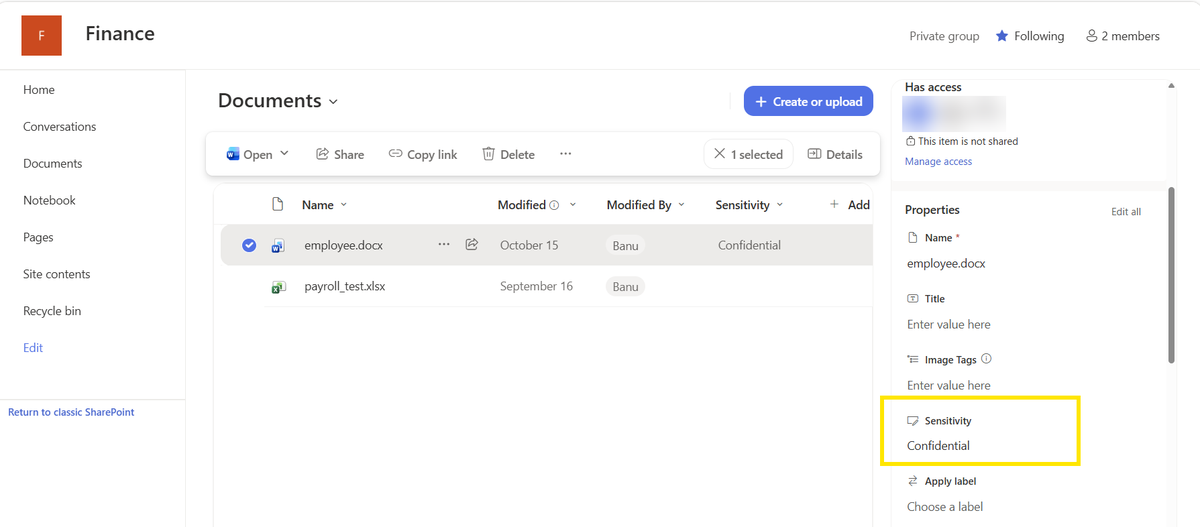
Back in the same Finance library, that file now shows Confidential, while payroll_test.xlsx right next to it still has nothing. Same site, same container label, two different results. Only the file label made a difference.
New files, automatically: set a default sensitivity label on the document library. New files added to that library get the label. This is a library setting, not the container label, and it’s off until you turn it on.
Existing files, at scale: use service-side auto-labelling in Purview. Run it in simulation mode first, check what it would label, then turn it on.
Three things to know
- Container labels never label files. If someone tells you “we labelled all our sensitive sites, so the data is protected”, ask what’s protecting the files once they leave the site.
- The tenant sharing setting is the ceiling. A container label can make a site’s sharing stricter than the tenant-wide SharePoint setting, never looser. If a site won’t allow sharing that the label says it should, check the tenant setting first.
- Labels for sites need switching on. If “Groups & sites” is greyed out when you create a label, sensitivity labels for containers haven’t been enabled in your tenant yet. It’s a one-time setup step.
Container labels protect the room. File labels protect the document. If you want the data protected, you need file labels.
Test it yourself
- Create or edit a label with Groups & sites settings: private, no guests, internal sharing only
- Apply it to a test site and confirm the sharing and privacy settings go grey
- Upload a file to that site and check its Sensitivity property
- Download the file and check again
- Apply a file label to one document and compare the two in the library
All demos use a fictional company (Harborline Freight) in my own lab tenant. No real data.
Watch it happen: the video on YouTube.
Settings, scripts and checklist: the lab repo.
Questions or corrections: LinkedIn or banu@virtualbuddy.in.